| |
Without a doubt, Visio is the easiest Microsoft Windows software to use.
Simply open a file, drag objects and connectors onto a printable area, and
either save or print the file. It's just that simple.
So why attend a presentation demonstrating how to use Visio? There's two
reasons:
- Because there's more to designing effective graphical procedures than
just dragging pre-drawn images onto a page;
- Because Visio does more -- a LOT more -- than just give users pre-drawn
figures to arrange on a page for printing.
After a quick overview of Visio's features, Beau Cain demonstrates how to
arrange objects and connectors in order to describe relationships, processes,
and even procedures. Along the way, he'll show how to open specialized
stencils for dozens of specialized diagrams, import images from other programs,
create multiple-page drawings, and convert Visio diagrams to HTML.
Cain also demonstrates some of Visio's most common timesavers, too. If you
include diagrams of processes in your documentation, you can give yourself an
edge by using Visio.
Beau Cain
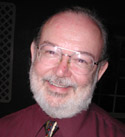 Beau Cain is a consultant who applies a broad array of communication and project
management experience to his varied projects. He also develops and teaches
courses ("Getting Up To Speed Quickly With Visio", "Designing Persuasive
Presentations With PowerPoint", "Building Books With Microsoft Word", and
"Writing White Papers For Product Development and Sales") for the Technical
Writing Certificate program at San Jose State's Professional Development Center.
As well, he expects to publish he first book this year, "Building Books With
Microsoft Word", and he serves as the Director of Region 8 on STC's Board
of Directors.
Beau Cain is a consultant who applies a broad array of communication and project
management experience to his varied projects. He also develops and teaches
courses ("Getting Up To Speed Quickly With Visio", "Designing Persuasive
Presentations With PowerPoint", "Building Books With Microsoft Word", and
"Writing White Papers For Product Development and Sales") for the Technical
Writing Certificate program at San Jose State's Professional Development Center.
As well, he expects to publish he first book this year, "Building Books With
Microsoft Word", and he serves as the Director of Region 8 on STC's Board
of Directors.
|
 Date:
Date: